> For the complete documentation index, see [llms.txt](https://modding.corekeepergame.com/llms.txt). Markdown versions of documentation pages are available by appending `.md` to page URLs; this page is available as [Markdown](https://modding.corekeepergame.com/documentation/creating-mods/setting-up-the-modding-environment.md).
# Setting up the Modding Environment
This page will walk you through how to set up unity and install the ModSDK unity project.
You will need to have Unity to open up the ModSDK.
The Core Keeper Mod SDK (Software Development Kit) is a Unity project which can be opened with Unity version `6000.0.59f2` , you can download the Mod SDK itself [here](https://github.com/Pugstorm/CoreKeeperModSDK).
1. Download the project to your PC, either using Git or by clicking the green `Code > Download ZIP` button on the right side of the page and once it has download open it up and extract it to an empty folder that'll be easy to find, like on your desktop.\
Git is a version control system that helps track changes and if needed revert them. Please see [this link](https://docs.github.com/en/get-started/using-git/about-git) for additional information.
2. Install and open Unity Hub. You can install it from [here](https://unity.com/download).
3. Create a Unity account if you haven't already, and log into the Unity Hub with it.
4. Please install the required Unity version from [this link](https://unity.com/releases/editor/archive) (6000.0.59f2). You will have to filter by "LTS" so that you can find the correct version. Once you found the correct version, press the blue install button.
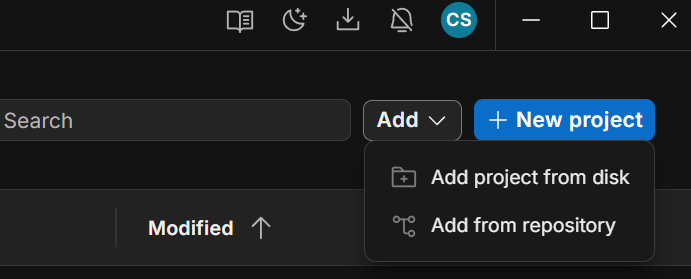
5. In Unity Hub, press "Add -> Add project from disk" in the top right of the window and select the folder where you downloaded the SDK. The project should now appear in the Unity Hub projects list.\
6. (Optional) Press the three dot menu next to the project, select "Add command line arguments", add `-disable-assembly-updater` and press Save. This is not strictly required, but it will remove some errors from the log when you open the project.\

7. Open the project. If you do not already have a matching Unity Editor version, Unity Hub will guide you through installing it. **Make sure to enable "Linux Build Support (Mono)" or you won't be able to install or build your mods.** All other options can be left at their default values. If You are on Linux you will need to enable the "Windows Build Support" module.
You might occasionally see some errors in the log. This is not necessarily always a problem, especially before fully loading the game files into the project, but we will try to keep this as clean as possible.
---
# Agent Instructions
This documentation is published with GitBook. GitBook is the documentation platform designed so that both humans and AI agents can read, navigate, and reason over technical content effectively. Learn more at gitbook.com.
## Querying This Documentation
If you need additional information that is not directly available in this page, you can query the documentation by asking a question.
Perform an HTTP GET request on the following URL with the `ask` and `goal` query parameters:
```
GET https://modding.corekeepergame.com/documentation/creating-mods/setting-up-the-modding-environment.md?ask=&goal=
```
`ask` is the immediate question: it should be specific, self-contained, and written in natural language.
`goal` is what the user is ultimately trying to achieve, the reason they need the answer. Sharing it helps GitBook give you a better, more relevant answer. A goal is most helpful when it describes the outcome the user wants rather than restating the question. For example, with `ask=how do I create an API token`, a goal like `automate deployments from our CI pipeline` lets GitBook tailor the answer to that use case.
The response will contain a direct answer to the question and relevant excerpts and sources from the documentation.
Use this mechanism when the answer is not explicitly present in the current page, you need clarification or additional context, or you want to retrieve related documentation sections.


 6. (Optional) Press the three dot menu next to the project, select "Add command line arguments", add `-disable-assembly-updater` and press Save. This is not strictly required, but it will remove some errors from the log when you open the project.\

7. Open the project. If you do not already have a matching Unity Editor version, Unity Hub will guide you through installing it. **Make sure to enable "Linux Build Support (Mono)" or you won't be able to install or build your mods.** All other options can be left at their default values. If You are on Linux you will need to enable the "Windows Build Support" module.
You might occasionally see some errors in the log. This is not necessarily always a problem, especially before fully loading the game files into the project, but we will try to keep this as clean as possible.
---
# Agent Instructions
This documentation is published with GitBook. GitBook is the documentation platform designed so that both humans and AI agents can read, navigate, and reason over technical content effectively. Learn more at gitbook.com.
## Querying This Documentation
If you need additional information that is not directly available in this page, you can query the documentation by asking a question.
Perform an HTTP GET request on the following URL with the `ask` and `goal` query parameters:
```
GET https://modding.corekeepergame.com/documentation/creating-mods/setting-up-the-modding-environment.md?ask=
6. (Optional) Press the three dot menu next to the project, select "Add command line arguments", add `-disable-assembly-updater` and press Save. This is not strictly required, but it will remove some errors from the log when you open the project.\

7. Open the project. If you do not already have a matching Unity Editor version, Unity Hub will guide you through installing it. **Make sure to enable "Linux Build Support (Mono)" or you won't be able to install or build your mods.** All other options can be left at their default values. If You are on Linux you will need to enable the "Windows Build Support" module.
You might occasionally see some errors in the log. This is not necessarily always a problem, especially before fully loading the game files into the project, but we will try to keep this as clean as possible.
---
# Agent Instructions
This documentation is published with GitBook. GitBook is the documentation platform designed so that both humans and AI agents can read, navigate, and reason over technical content effectively. Learn more at gitbook.com.
## Querying This Documentation
If you need additional information that is not directly available in this page, you can query the documentation by asking a question.
Perform an HTTP GET request on the following URL with the `ask` and `goal` query parameters:
```
GET https://modding.corekeepergame.com/documentation/creating-mods/setting-up-the-modding-environment.md?ask=